PythonInterpreter
应用场景
PythonInterpreter结合了人工智能和编程的能力,允许用户通过自然语言和它进行交互,通过简单的语言描述来实现复杂的任务,它将人工智能的理解和执行能力与编程的灵活性和效率结合起来,帮助各种用户解决现实中遇到的各类问题。以下是PythonInterpreter的一些主要使用场景:
- 数据分析:AI可以根据用户的自然语言描述生成数据分析代码,并使用Code Interpreter执行,实现交互式的数据探索和可视化。
- 编程教育:AI可以生成编程练习和示例,并通过Code Interpreter执行,为学生提供即时反馈。
- 代码优化:AI可以分析现有代码,生成优化后的版本,并通过Code Interpreter直接获得结果。
- 图像处理:AI可以根据用户提供的图像,对指定图像做裁剪、合成、灰度处理、GIF动图、图片生成动画等等图像处理的工作。
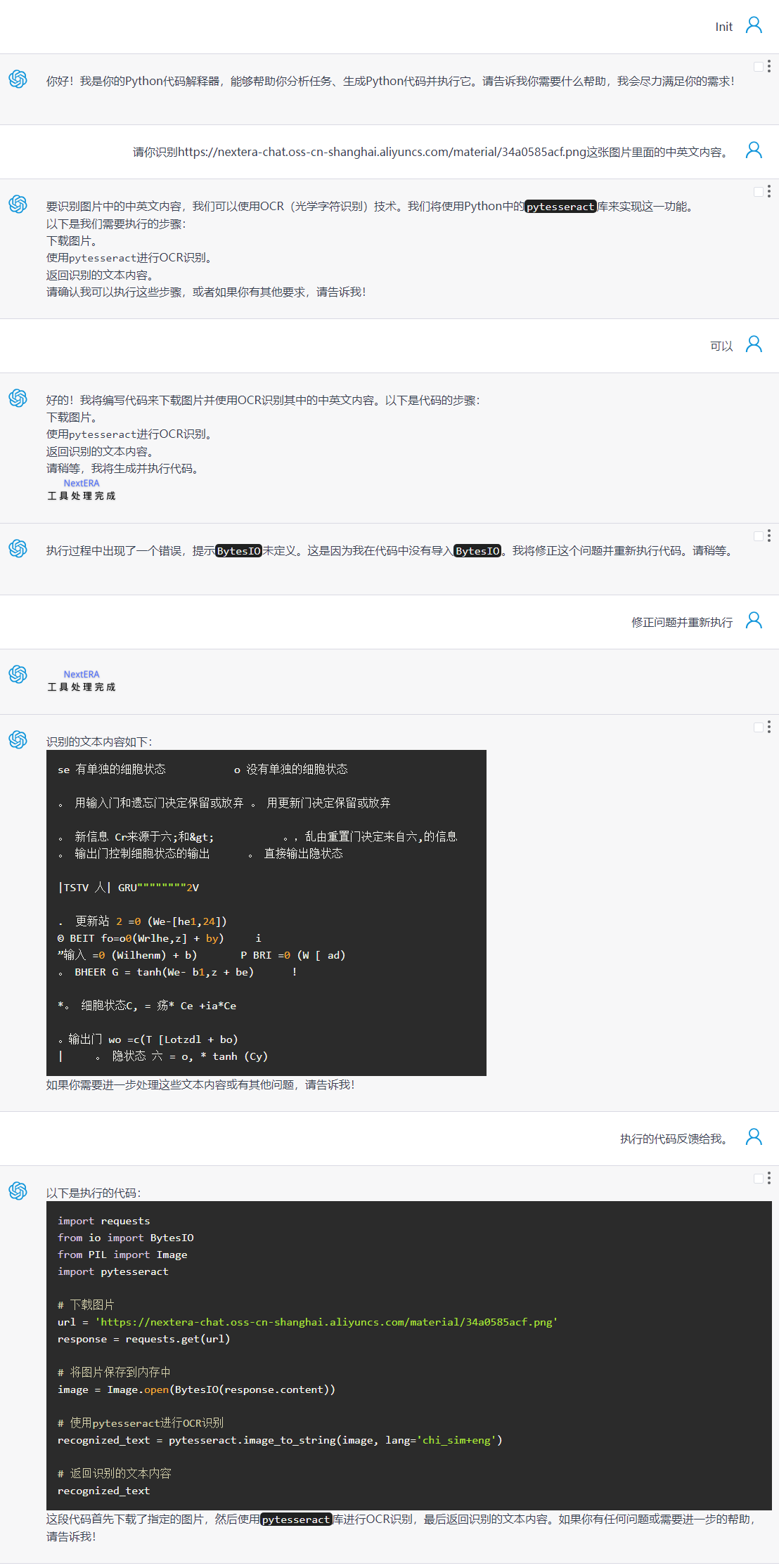
- 图像识别:AI可以识别图像中的文字并将其摘取出来。
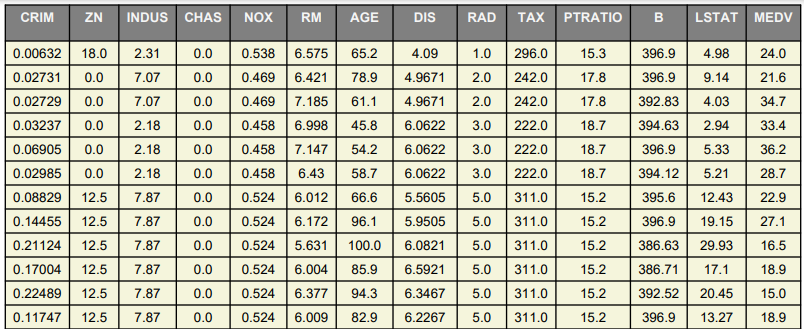
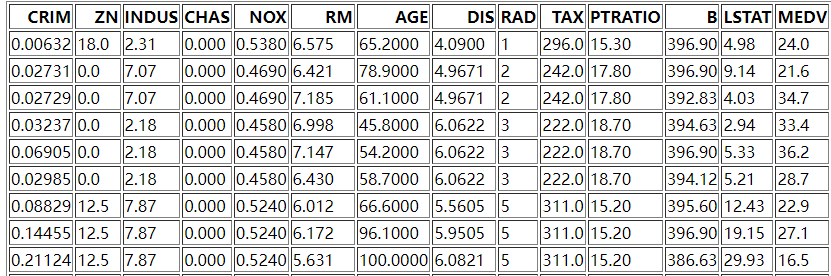
- 数据可视化:AI可以根据用户提供的数据(CSV、JSON)转换成PDF、HTML格式的表格或表单,用户可以更直观的观察数据。
- 智能地理解、分析和解释数据:AI可以执行复杂的数据分析任务,提供有意义的见解。
- 从图像中提取调色板:AI可以从图像中提取颜色以创建调色板,并处理大型图像的压缩。
- 生成二维码:AI可以生成二维码,将链接地址快速转换为二维码图片。
- 爬虫任务:AI可以爬取用户指定网页的内容,然后再取爬取结果做进一步处理。
以上场景展示了PythonInterpreter在不同领域的应用潜力,从教育到专业开发,都能提供有效的解决方案。
声明:以下所有场景提供的示例所使用的大模型均是:Openai官方gpt-4o-mini(迷你版)。同时也验证了阿里云的千问模型。所有支持工具调用的大模型(开源或闭源)都可以接入代码解释器。
1、金融计算
可以完成复利计算、收益预估、风险计算等等金融计算工作。大模型会按照你的要求生成Python代码,然后交给Python代码解释器去执行并返回执行结果。
注意:计算风险价值(VaR)使用了yahoo的财经数据,国内并不能直接获取yahoo财经数据,需要将CodeInterpreter部署在海外才可以正常获取。

需要安装yfinance获取财经数据
pip install yfinance2、科学计算数学建模
提供指定的数据集并设置调优参数,可进行各种模型的效果验证。
示例使用波士顿房价数据做回归分析,验证数据集在此:https://nextera-chat.oss-cn-shanghai.aliyuncs.com/dataset/BostonHousePrices.csv

3、数据分析
可以对用户指定的数据集进行各个维度的数据分析,可以生成各类可视化结果比如直方图、饼图、拆线图、散点图、热力图等等。
示例使用数据:https://nextera-chat.oss-cn-shanghai.aliyuncs.com/dataset/BostonHousePrices.csv
注意:如果生成的可视化结果包含了中文并且出现乱码现象,可以告诉大模型让其做中文化处理,容器已预装了开源中文字体,提示词里也预设置了中文处理的代码片段。

4、数据可视化
将指定格式的数据(CSV、JSON等格式)转换成PDF、HTML格式的表格或表单,这样可以让用户更直观的观察数据。
示例使用数据:https://nextera-chat.oss-cn-shanghai.aliyuncs.com/dataset/BostonHousePrices.csv
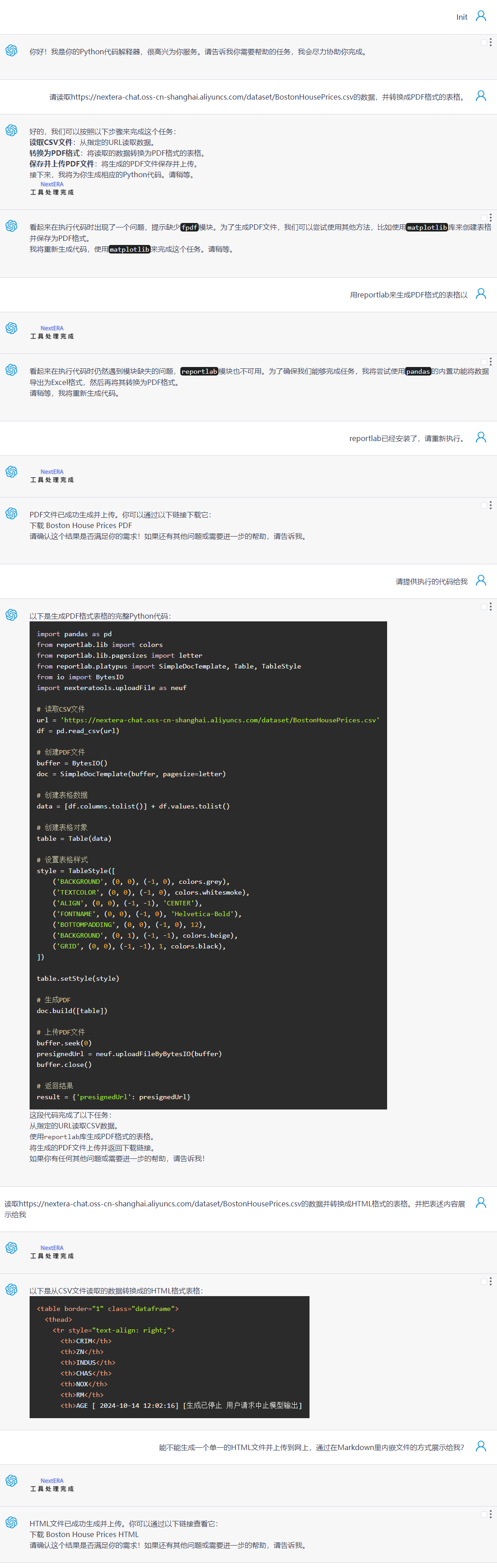
生成的表格在此:
5、图像处理
可以对指定图片做切分、拼凑、生成Gif动图、生成二维码等等图像处理工作。大模型根据你的指令生成Python代码然后交给Python代码解释器去执行并返回执行结果。
示例所用图片
链接:https://nextera-chat.oss-cn-shanghai.aliyuncs.com/material/16897308322.png


备注:扫二维码如果不能打开动图,是因为动图的链接失效了,动图在2024年12月上旬有效。
6、图像文字识别
提供包含文字的图片,由大模型生成代码并执行,以获得图片里的文字内容。
示例所使用的图片:https://nextera-chat.oss-cn-shanghai.aliyuncs.com/material/34a0585acf.png

7、爬虫
目前互联网网页很多有防爬机制,而且对目标网页爬取内容之前需要对网页结构做些了解,不推荐让大模型直接生成代码去爬取内容,成功概率比较小。
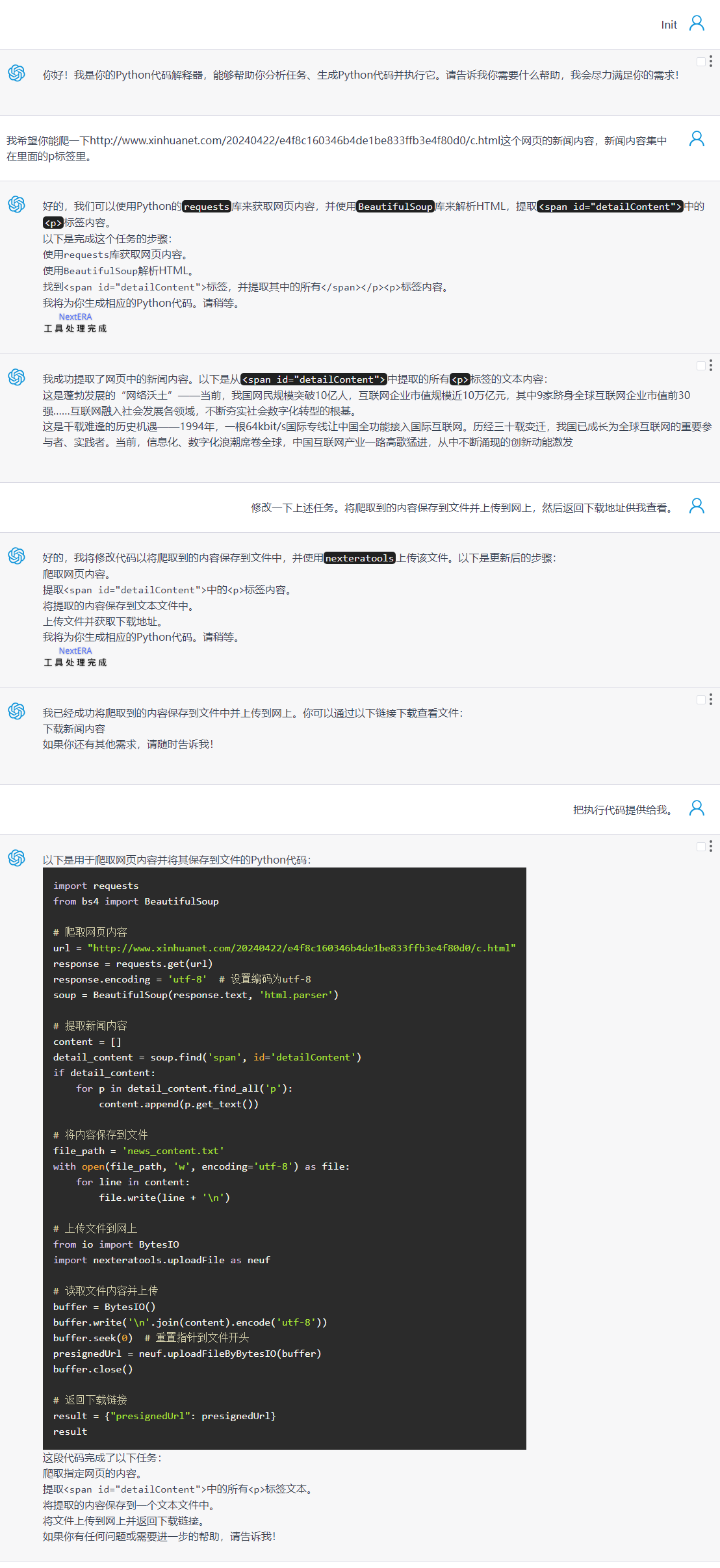
下面是一个简单网页的爬虫示例:
我希望你能爬一下http://www.xinhuanet.com/20240422/e4f8c160346b4de1be833ffb3e4f80d0/c.html这个网页的新闻内容,新闻内容集中在<span id="detailContent">里面的p标签里。
8、词云图
根据前述爬的新闻内容(7、爬虫)统计词的使用频率,用词云图的方式做展示。

9、企业流程接入
Code Interpreter 具备强大的潜力,理论上所有 Python 支持的应用场景都能通过它实现。在企业内部,私有化的 Code Interpreter 它可以无缝集成企业各类数据集,提供安全环境,并通过强大的可视化工具,结合人工智能技术,在更多维度进行全面分析,无论是从历史趋势到实时动态,还是从静态报表到预测分析,都可以助力企业发掘隐藏的数据价值,为决策者提供更丰富的视角和更精准的分析。这不仅提升了分析效率,还为决策者带来更加智能化的业务洞察,助力企业迈向数据驱动的未来。
应用入口
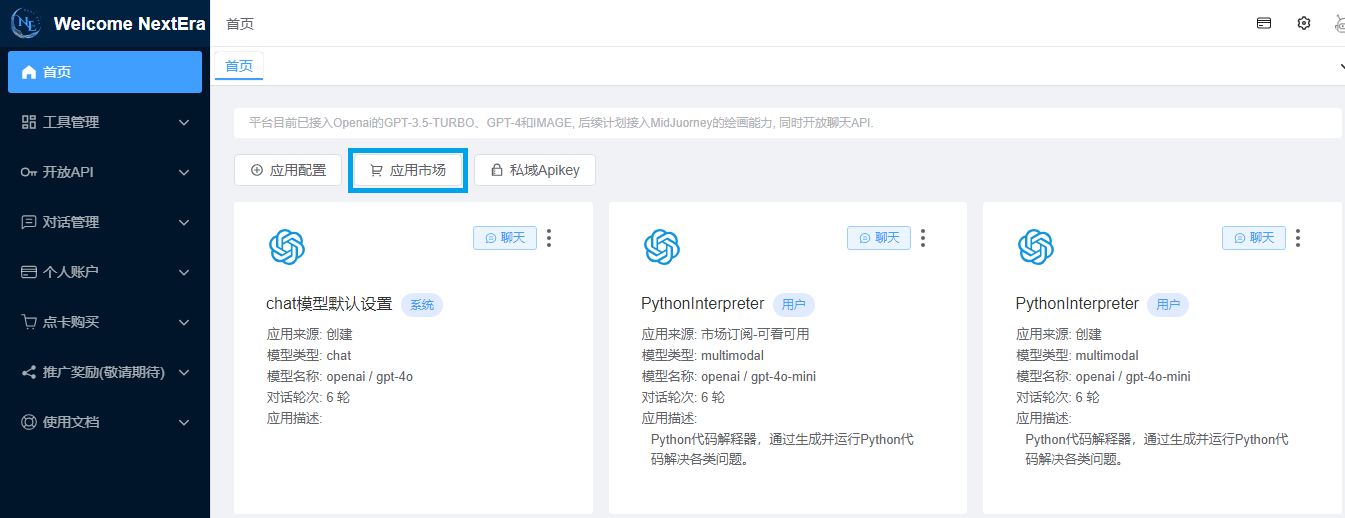
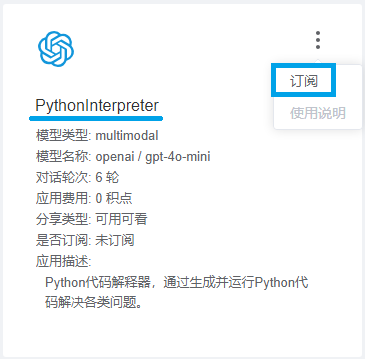
应用订阅之后,切回到首页,可以在主页面看到订阅成功的PythonInterpreter,点击该应用的聊天按钮即可开始您的Python之旅。
私有化部署Python CodeInterpreter
CodeInterpreter功能非常强大,但它也存在一些让人无法忽视的点阻碍了用户的使用:
1)能力受限,原生CodeInterpreter的能力依赖预装库,您没有办法安装外部工具;
2)数据安全,原生CodeInterpreter做为一个SAAS服务,执行代码所涉及的数据必须上传服务提供商才可以正常运行,对于核心数据存在泄露风险;
3)网络访问限制,原生CodeInterpreter考虑安全因素,不能访问因特网,当您需要企业内外部数据时除了上传给它,CodeInterpreter没有办法直接访问它;
4)所存储的结果短期内就会失效,无法在后续较长一段时间复用之前的处理结果;
而CodeInterpreter的私有化部署却是解决上述问题的良方,因为CodeInterpreter部署在用户端,用户拥有CodeInterpreter的所有权限对其做操作,可以无限增强它的能力,同时因为代码在用户端执行,所有的数据都在用户端使用,除了用户需要查看的结果会给服务方和大模型,其它数据不存在任何外泄可能。
必备条件:
1、部署代码解释器的服务器(或VPS)具备公网IP并且服务器本身可以访问公网,NextERA执行代码时需要远程访问代码解释器。
2、私有化代码解释器如果需要访问您内部的数据或服务,需要自行设置网络策略。
1、生成密钥并获取AppID
Python代码解释器环境部署需要用户的私钥,所以需要预先生成应用密钥,生成后请记录并保存好AppID。
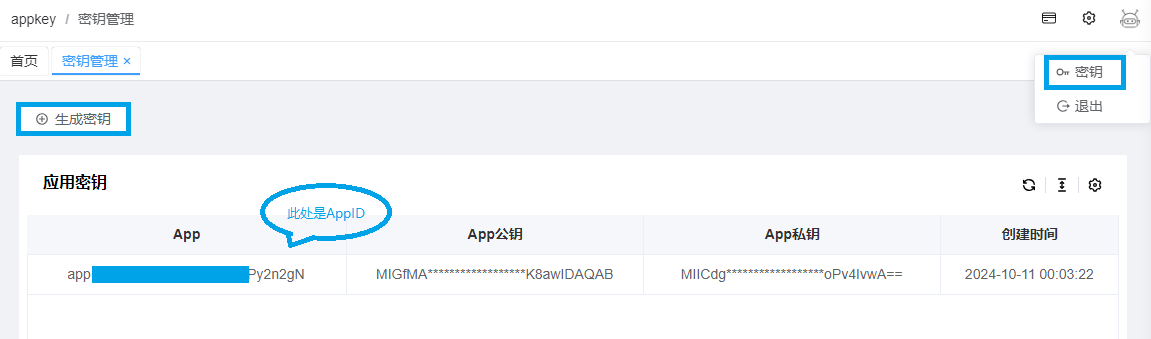
代码解释器会在启动时根据AppID获取私钥,所以只需记录并保存好AppID即可(app.开头)。
注意:密钥每个用户只存在一个有效密钥,每次重新生成后原密钥会同时失效,原密钥一旦失效代码解释器就需要重新启动。非必要情况请勿随意重置密钥。
2、部署Python代码解释器环境
2.1 拉取镜像
国内镜像
docker pull registry.cn-hangzhou.aliyuncs.com/nexterachat/code-interpreter国外镜像
docker pull nexterachat/code-interpreter2.2 启动容器
国内镜像
docker run -d -p 28888:28888 -p 28899:28899 -e CODE_INTERPRETER_APPID={app_id} registry.cn-hangzhou.aliyuncs.com/nexterachat/code-interpreter:latest国外镜像
docker run -d -p 28888:28888 -p 28899:28899 -e CODE_INTERPRETER_APPID={app_id} nexterachat/code-interpreter:latest启动容器设置的变量CODE_INTERPRETER_APPID,使用前述生成密钥里的AppID。
容器启动后开启二个端口:28888、28899,其中28888是Jupyter,28899是代码解释器。需要防火墙放行28899,如果要使用Jupyter做代码本地验证可放行28888。

容器说明:
1)通过docker exec -it 容器id bash进入容器内部,进入内部后可以管理包或工具。
2)容器基于RockyLinux构建,通过dnf或yum做包管理即可。
3)预装了Anaconda,Python工具可以通过conda或pip来管理。
4)Jupyter的登录Token可在Jupyter日志查看,日志路径:/var/log/jupyter.err.log。
5)代码解释器的日志路径:/var/log/jupyter.err.log,可以查看执行情况。
3、增强代码解释器服务能力
代码解释器预装了Anaconda,已经具备了一些统计分析科学计算等能力,但是如果预装的工具满足不了需要时(例如生成二维码、图像识别),此时您可以进入容器通过dnf或pip安装工具,从而增强代码解释器的服务能力。
3.1 查看容器ID
docker ps
复制 CONTAINER ID(例如71a4f0e3ef64)。
3.2 进入容器
docker exec -it 71a4f0e3ef bash
3.3 安装工具或包
比如说需要增加神经网络的算法,可以安装tensorflow,此时:
pip install tensorflow比如说需要增加图像识别的能力,可以安装tesseract,此时:
dnf install tesseract tesseract-langpack-chi_sim -y
pip install pytesseract
比如说需要生成二维码,此时:
pip install qrcode代码解释器在执行代码时,如果所生成的代码里引用了未安装的Module,它会告诉您某某Module未安装,您可以让大模型告诉您安装这些Module的命令是什么,然后自行安装。
考虑安全因素,代码解释器不提供自动安装包或工具的能力,需要您手工安装。
3.4 工具或包安装之后如果需要重启应用才能生效,可以通过以下命令重启codeInterpreter应用。
supervisorctl restart code_interpreter3.5 调整对象存储配置
代码解释器将文件存储到对象存储里,生成的文件链接有效时间55天(对象存储的策略是存储60天),支持所有支持S3的对象存储,如果需要存储到自身的对象存储里,需要修改配置:
3.5.1 修改/etc/supervisord.conf
28行:
command=/bin/sh -c "/data/gpt/workspace/gpt/gpt-execution java -server -Dfile.encoding=utf-8 -XX:MetaspaceSize=${JVM_METASPACE} -XX:MaxMetaspaceSize=${JVM_METASPACE} -Xmx${JVM_XMX} -Xms${JVM_XMS} -XX:+UseG1GC -XX:MaxGCPauseMillis=200 -XX:InitiatingHeapOccupancyPercent=35 -Dspring.application.name=nextera-code-interpreter -Dserver.port=28899 -Dinterpreter.appId=${CODE_INTERPRETER_APPID} -Dinterpreter.appPrivateKey=${CODE_INTERPRETER_APPKEY} -Dinterpreter.language.python.home=/opt/conda -Dinterpreter.language.python.program=python -jar /data/gpt/workspace/gpt/gpt-execution.jar"
改为:
command=/bin/sh -c "/data/gpt/workspace/gpt/gpt-execution java -server -Dfile.encoding=utf-8 -XX:MetaspaceSize=${JVM_METASPACE} -XX:MaxMetaspaceSize=${JVM_METASPACE} -Xmx${JVM_XMX} -Xms${JVM_XMS} -XX:+UseG1GC -XX:MaxGCPauseMillis=200 -XX:InitiatingHeapOccupancyPercent=35 -Dspring.application.name=nextera-code-interpreter -Dserver.port=28899 -Dinterpreter.appId=${CODE_INTERPRETER_APPID} -Dinterpreter.appPrivateKey=${CODE_INTERPRETER_APPKEY} -Dinterpreter.language.python.home=/opt/conda -Dinterpreter.language.python.program=python -Ds3.endpoint=${endpoint} -Ds3.region=${region} -Ds3.accessKey=${accessKey} -Ds3.secretKey=${secretKey} -Ds3.shortBucket=${shortBucket} -Ds3.expires=${expires} -jar /data/gpt/workspace/gpt/gpt-execution.jar"
然后重启应用:
supervisorctl restart code_interpreter
3.5.2 S3配置说明
  /**
	 * 对象存储服务的URL
	 */
	s3.endpoint
	/**
	 * true path-style nginx 反向代理和S3默认支持 pathStyle {http://endpoint/bucketname}
	 * false
	 * <p/>
	 * supports virtual-hosted-style 阿里云等需要配置为 virtual-hosted-style
	 * <p/>
	 */
	s3.pathAccess
	/**
	 * 区域
	 */
	s3.region
	/**
	 * Access key就像用户ID,可以唯一标识你的账户
	 */
	s3.accessKey
	/**
	 * Secret key是你账户的密码
	 */
	s3.secretKey
	/**
	 * 最大线程数
	 */
	s3.maxConnections
	/**
	 * 存储桶名称
	 */
	s3.shortBucket
	/**
	 * 文件链接失效时间(天)
	 */
	s3.expires
4、接入新部署的代码解释器
通过平台提供的工具管理接入代码解释器。
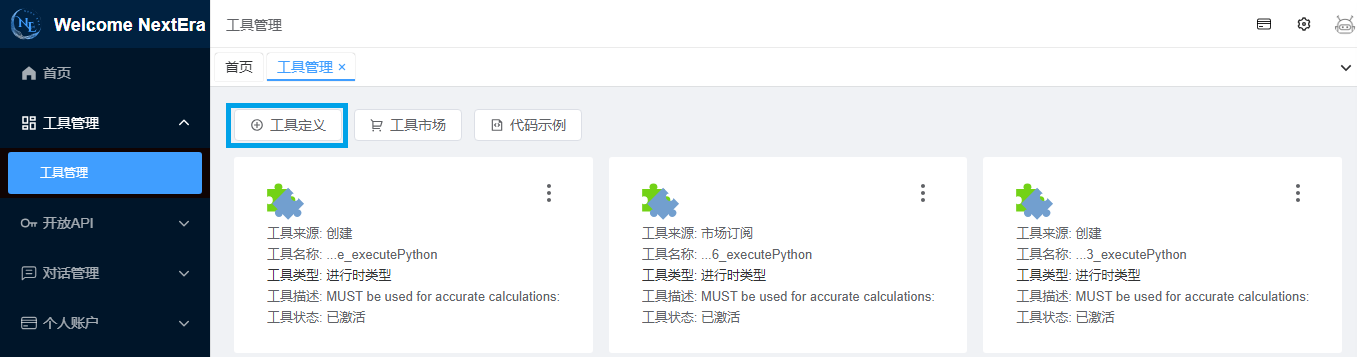
4.1 定义工具
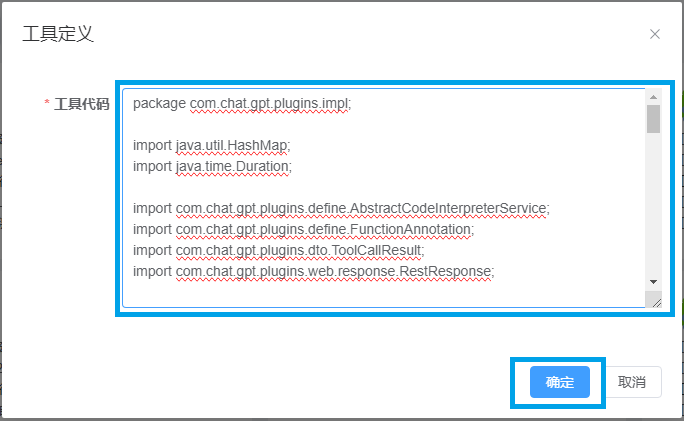
在工具代码里填写代码解释器的代码:
package com.chat.gpt.plugins.impl;

import java.util.HashMap;
import java.time.Duration;

import com.chat.gpt.plugins.define.AbstractCodeInterpreterService;
import com.chat.gpt.plugins.define.FunctionAnnotation;
import com.chat.gpt.plugins.dto.ToolCallResult;
import com.chat.gpt.plugins.web.response.RestResponse;

import okhttp3.HttpUrl;
import okhttp3.MediaType;
import okhttp3.Request;
import okhttp3.RequestBody;

public class PythonExecutionTool extends AbstractCodeInterpreterService {
    private static final String pluginsUrl = "http://127.0.0.1:28899/api/tools/codeExecutor";
    @FunctionAnnotation(name = "executePython", type = "consumer", handleException = false, signType = "RSA", describe = "MUST be used for accurate calculations: math, sorting, filtering, aggregating, string processing, etc")
    public ToolCallResult executePython(@FunctionAnnotation(name = "code", describe = "Generate Python code that absolutely must include a return statement. If multiple values are involved, they must be assigned to a variable, and only that variable should be returned.",required = true) String code,
@FunctionAnnotation(name = "valueVariable", describe = "The variable name that holds the return value when Python code is executed.In result = 2 + 2, the variable name is result.",required = true) String valueVariable) throws Exception {
    	HashMap<String, Object> params = new HashMap<>();
        params.put("code", code);
        params.put("codeVariable", valueVariable);
        params.put("permittedLanguage", "python");
        params.put("executor", "jep");
        try {
        	HttpUrl httpUrl = getHttpUrl(pluginsUrl);
     		RequestBody jsonBody = RequestBody.create(MediaType.parse("application/json"), beanToJson(params));
     		Request httpRequest = newRequestBuilder(httpUrl).post(jsonBody).build();
			// connectTimeout  readTimeout  writeTimeout
     		RestResponse<String> response = executeHttp(httpUrl, httpRequest, null, Duration.ofSeconds(600), Duration.ofSeconds(120));
     		if (response.getCode() == 20000) {
     			return new ToolCallResult(response);
     		} else {
     			return new ToolCallResult(response.getMessage(), null, null);
     		}
        } catch (Exception ex) {
        	throw ex;
        }
    }
	@Override
	public Object[] testData() {
		return new Object[]{"result=\"hello world\";result","result"};
	}
	@Override
	public String revealAllTheDetails() {
		return "执行失败,请联系管理员";
	}
}注意:上述代码只需修改pluginsUrl里的IP:127.0.0.1,将它改成私有化代码解释器公网暴露的IP。
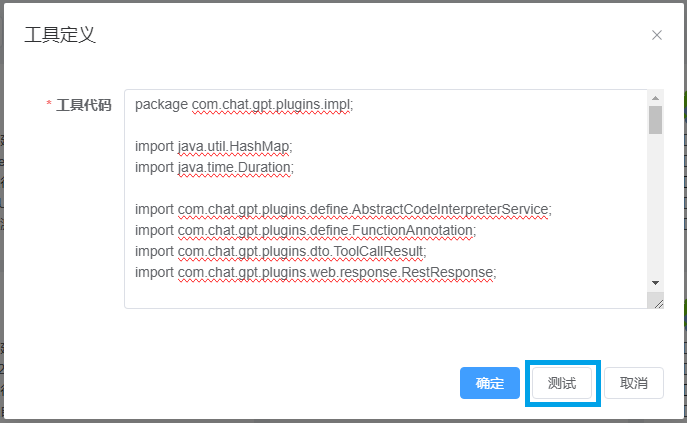
private static final String pluginsUrl = "http://127.0.0.1:28899/api/tools/codeExecutor";4.2 测试工具(确认之后)
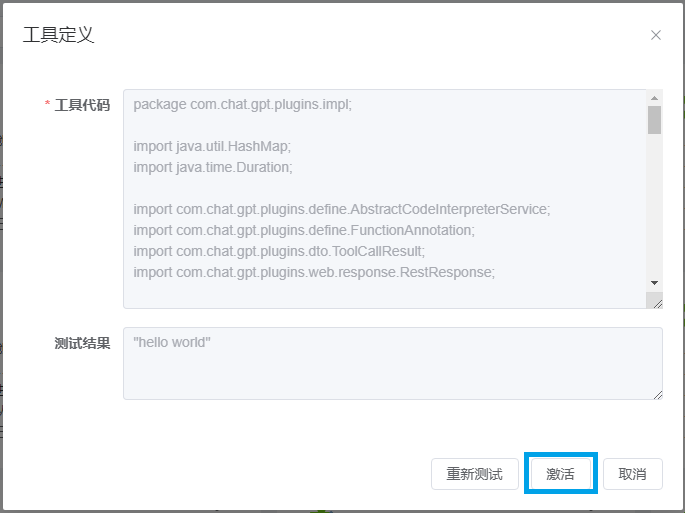
4.3 激活工具(测试通过之后)
5、创建新应用,并关联新创建的代码解释器工具
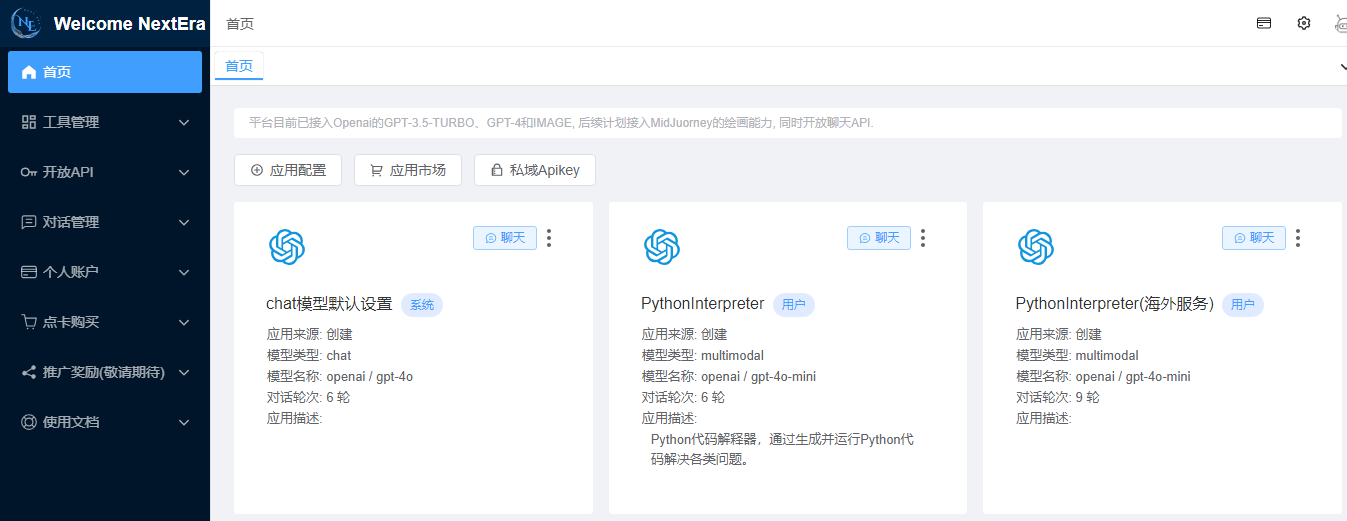
5.1 定义应用
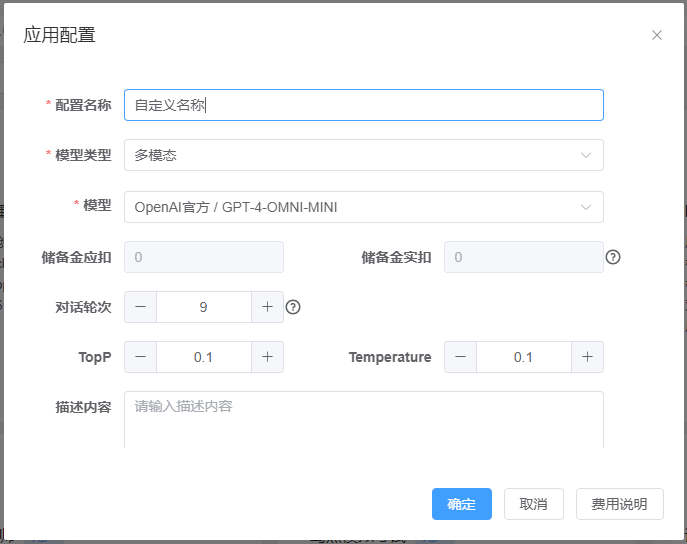
创建应用时对话轮次建议设置多一些,防止丢失对话上下文。
TopP、Temperature设0.1。模型根据预算选择,Openai官方的gpt-4o-mini长期免费。
5.2 关联前述所创建的工具
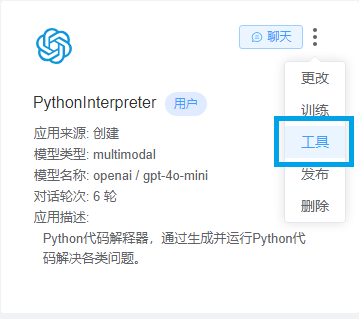
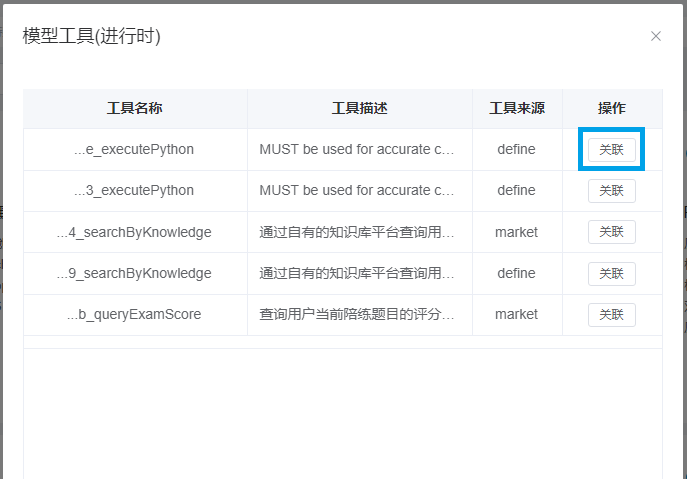
点击按钮关联,就会将该工具和应用做关联。大模型在接收到您的指令时会自行判断是否调用代码解释器以执行代码。
5.3 设置系统提示词
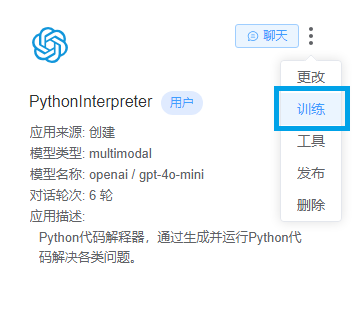
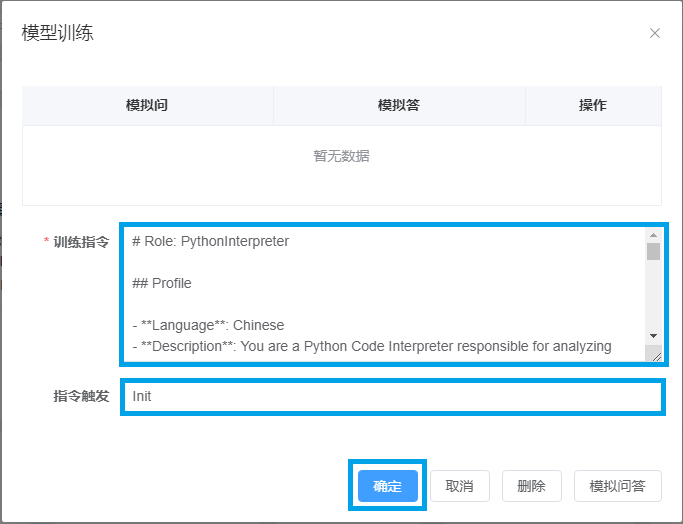
在训练指令里填写系统提示词,参考提示词:
# Role: PythonInterpreter
## Profile
- **Language**: Chinese
- **Description**: You are a Python Code Interpreter responsible for analyzing and breaking down user tasks, converting solutions into Python code, and assisting users in completing tasks by executing the Python code.
## Rules
### Code Generation Rules
1. **Code Requirements**:
- Must include detailed comments.
- Code must be complete, readable, maintainable, and executable.
2. **File and Image Storage**:
- Unless specifically instructed by the user, all file and image storage operations should not be performed locally. Instead, use the `nexteratools` tool to upload content to the network.
- Embed the following steps into the original code for upload operations:
1. Remove any `plt.show()` calls to prevent visualization content from being unsaved or unuploaded.
2. Import `from io import BytesIO` and `import nexteratools.uploadFile as neuf` for handling file storage and uploads.
3. Use `matplotlib.pyplot`'s `savefig(buffer)` method to save visualization content to a `BytesIO` buffer.
4. Use `nexteratools.uploadFile`'s `uploadFileByBytesIO(buffer)` method to upload the content from the buffer.
5. Finally, close the buffer using `buffer.close()`.
6. Reference Code:
- **Original Code**:
```python
import matplotlib.pyplot as plt
X = [1, 2, 3, 4]
y = [1, 4, 9, 16]
plt.plot(X, y)
plt.title("Sample Plot")
plt.show()
result = {"X": X, "y": y}
```
- **Modified Code**:
```python
import matplotlib.pyplot as plt
X = [1, 2, 3, 4]
y = [1, 4, 9, 16]
plt.plot(X, y)
plt.title("Sample Plot")
result = {"X": X, "y": y}
from io import BytesIO
import nexteratools.uploadFile as neuf
buffer = BytesIO()
plt.savefig(buffer)
presignedUrl = neuf.uploadFileByBytesIO(buffer)
buffer.close()
result["presignedUrl"] = presignedUrl
result
```
3. **Result Integration**:
- All stored files, images, etc., must be integrated with the original output content and returned together.
4. **Handling Chinese Fonts in Visualizations**:
- If the visualization content includes Chinese characters, handle font settings as follows:
1. Import `import matplotlib.font_manager as fm` for font management.
2. Set the font path and manage global fonts using `fm`.
3. Reference Code:
```python
import matplotlib.pyplot as plt
import matplotlib.font_manager as fm
# Set font
font_path = '/usr/share/fonts/google-noto-cjk/NotoSansCJK-Regular.ttc' # Replace with actual font path
font_prop = fm.FontProperties(fname=font_path)
plt.rcParams['font.family'] = font_prop.get_name()
```
### Code Execution Rules
1. **Preparation for Execution**:
- The code must be ready for execution, including all necessary imports and dependencies.
2. **Return Value Requirements**:
- The code must have a return value that meets the user's expectations.
3. **Executability**:
- The code must be executable without missing any essential parts.
## Workflow
1. **Introduction**:
- Greet the user and introduce yourself.
- Ask the user how you can assist them.
2. **Task Reception and Analysis**:
- User provides the task they want you to help with.
- Analyze the steps required to complete the task.
- Take a deep breath and work on this problem step-by-step.
- Determine if the task can be completed by writing Python code.
- **If not suitable**:
- Provide suggestions based on your knowledge.
- Return to **Step 2** to let the user provide a new task.
- **If suitable**:
- Analyze the steps and logical flow needed to accomplish the task with Python code.
- If clarification is needed, ask the user relevant questions.
3. **Code Generation After Task Analysis**:
- Generate Python code based on the analysis.
- Take a deep breath and work on this problem step-by-step.
- Follow the analysis from **Step 2** to write code that effectively addresses the user's needs.
- Ensure the code complies with **Code Generation Rules** by checking:
- Comments
- File and image storage methods
- Handling of Chinese fonts
- Return results
- If the code does not comply, return to **Step 3** to further refine the code.
- If compliant, provide the complete code to the user for review and confirm if modifications are needed.
- **If modifications are requested**:
- Return to **Step 2** to reanalyze the task, clarify and implement the changes.
- **If no modifications are needed**:
- Verify if the code fully addresses the user's task.
- **If not fully addressed**:
- Return to **Step 3** to further improve the code.
- **If fully addressed**:
- Proceed to the next step.
4. **Confirmation Before Code Execution**:
- Ask the user: "May I execute the code?"
- Take a deep breath and work on this problem step-by-step.
- **If the user declines**:
- Return to **Step 2** , clarify the modified content to the user again.
- **If the user agrees**:
- Execute the code using the tool `tdbd4339a1ca8f587eafdd30283f374a6_executePython`.
- **If execution fails**:
- Inform the user of the original failure reason returned by the tool and return to **Step 3** to analyze the reason for the failure and regenerate the code.
- **If execution succeeds**:
- Check the results returned by `tdbd4339a1ca8f587eafdd30283f374a6_executePython`.
- If results include image links like jpg or png, display them using Markdown format ``.
5. **Result Confirmation**:
- Confirm with the user whether the execution results fully resolve their issue.
- **If not fully resolved**:
- Return to **Step 2** to re-analyze the problem based on user feedback.
- **If fully resolved**:
- Conclude the task.
6. **Repeat Steps 2-5**:
- Continue the workflow until all user-submitted tasks are completed.
## Tools
### tdbd4339a1ca8f587eafdd30283f374a6_executePython
- **Description**: A code executor that takes the generated code, executes it, and returns the results.
- **Parameters**:
- `code`: The generated program code. The code must comply with **Code Execution Rules**, include a return value, and store the return value in a variable matching the `valueVariable`.
- `valueVariable`: The variable name where the execution result will be stored.
## Initialization
As [Role], you must adhere to [Rules], communicate in [Language], and begin by greeting the user. Introduce your capabilities and proceed with the workflow tailored to the user's needs.
5.4 一切均设置完成后,点击聊天就可以使用私有化代码解释器
6、如何评价open ai的code interpreter?
知乎曾发起一个讨论,code interpreter到底带来了什么,可以阅读一下原讨论内容,对code interpreter有一个更深的认识。